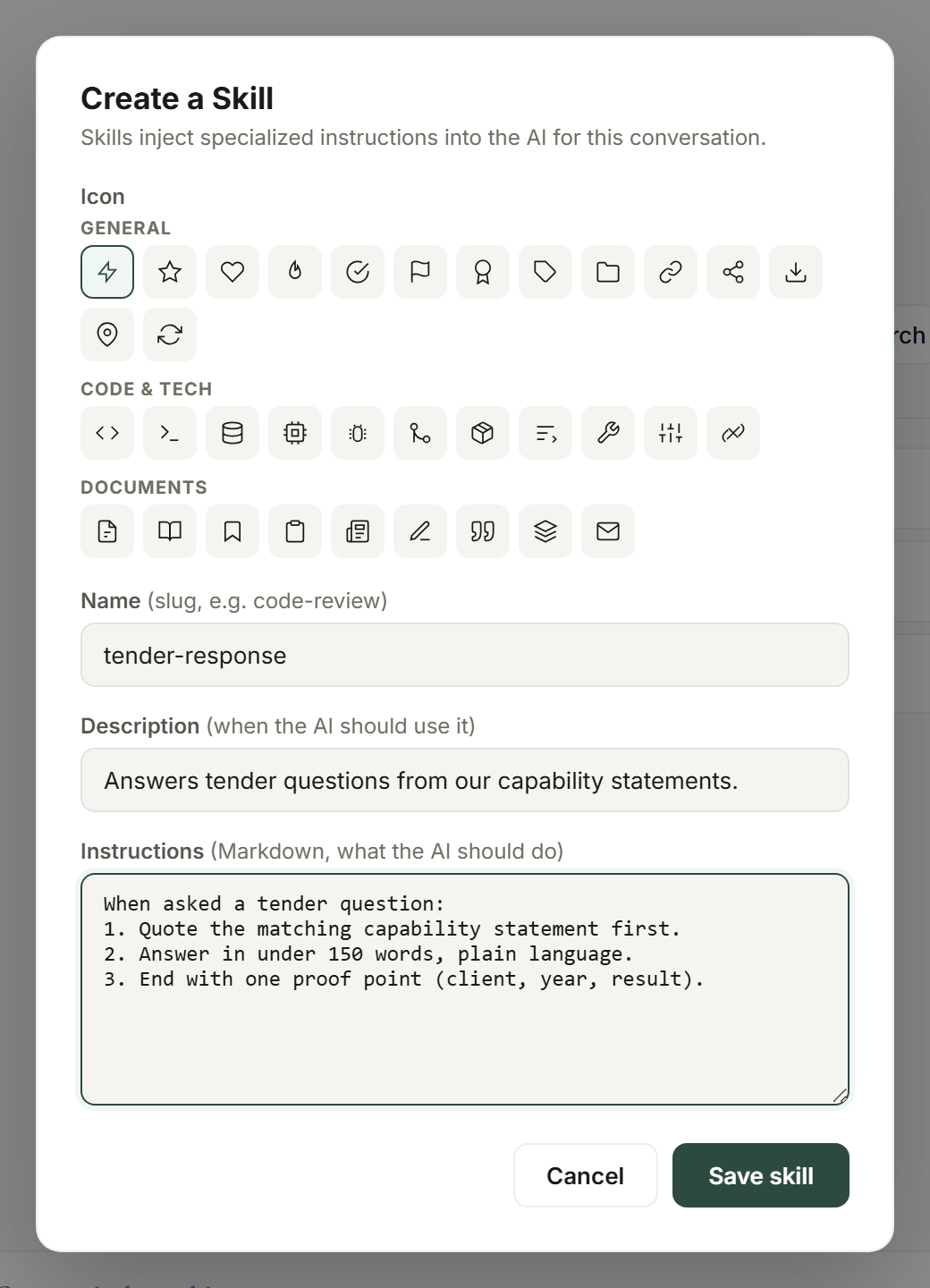
Open Settings and Skills. Choose Create skill or New in editor to build one, or upload a .skill, .md, or .zip package.
Create, open in the editor, or upload a .skill / .md package.
Try this
✦Open Settings from the bottom-left avatar, choose Skills, and click + Create skill. Name it Tender Compliance Check. If a colleague has already sent you tender-check.skill, click Upload .skill / .md and choose that file instead.
What you getThe new skill appears in your Skills list in Settings ready to be written or edited; an uploaded .skill, .md or .zip package lands in the same list.
Write an operational method
Define the goal, inputs, sequence, decisions, sources, output format, and checks. Use examples to explain real choices rather than to pad the package.
Write the method as steps a new colleague could follow.
Try this
✦In the skill editor for Payroll Variance Explainer, write: goal (explain every pay-run variance over 5 per cent), inputs (this run and last run exports), sequence (match employees, compute variance, classify as roster, rate or error), decision rules for each class, output as a table with one line per employee, and the check that totals reconcile.
What you getThe skill body reads like a procedure a new payroll officer could follow; add a single example only where a roster-versus-error call is genuinely ambiguous.
Activate and test
Activate the Skill, then test common, sparse, and unusual inputs. Confirm that it requests missing context and handles failure safely.
Activate the skill on its card, then test it in a fresh chat.
Try this
✦Click Activate on Property Inspection Report in Settings. Then, in a new session, attach the skill, attach only the photos and send:
Write the inspection report for 22 Banksia Court.
No inspection notes, no date, no tenant details.
What you getThe skill should ask for the missing notes and date rather than inventing a report around the photos; if it presses on, add a required-inputs check and re-test.
Attach it to a chat
In the composer, choose plus, Skills, then the Skill. Confirm its labelled chip before sending the request.
Search files, skills, brands, connectors, apps…
FilesSkillsBrandsConnectorsApps
Active skills inject their instructions into this conversation
Built-in
brand-kit-creatorBuilt-in brand-kit-creator skill
skill-creatorBuilt-in skill-creator skill
Literature reviewFind, verify, and synthesize literature - retrieve first, resolve DOIs, walk citation graphs.
PDF exploreMulti-hop PDF question-answering for long documents.
My Skills
brand-voiceWrites in the house voice: plain, warm, no jargon.
tender-responseAnswers tender questions from our capability statements.
weekly-reportTurns the week's notes into a one-page status report.
+ Create skill↑ Upload
Manage skills →
Ask Oppermind anything…
AutoAutoAuto · 50% · Pro · Balanced
Attach the skill to a chat from + → Skills.
Try this
✦In the composer click +, choose the Skills tab, select Grant Acquittal Summary and check its chip is above the composer, then send:
Run the acquittal summary for the Community Garden grant using the attached expenses-2026.xlsx and the funding agreement PDF.
What you getThe reply follows the skill's sequence and returns the acquittal summary in the format the skill defines, and the chip stays visible as your receipt that the method was applied.
Maintain custom Skills
Custom Skills can be reopened in the editor, changed, activated or deactivated, and removed. Re-test after material changes.
Reopen, edit, deactivate or delete custom skills from the same list.
Try this
✦Open Settings, Skills, and reopen Social Post Formatter in the editor. Change the caption limit from 150 to 125 words and save, then re-run it on last week's three product posts to check the new limit holds. Deactivate the old Legacy Formatter skill.
What you getThe edited skill keeps its place in the list with the new limit, the re-run captions come in under 125 words, and Legacy Formatter shows as deactivated in Settings.
GUIDED LEARNING
Practise this in Oppermind Academy
Follow the related tutorial or course and apply the concept to a real task.